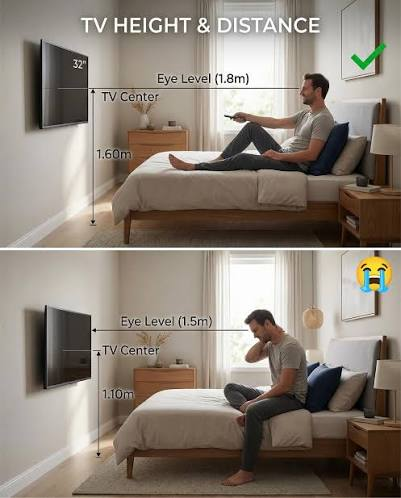

There’s a common living room setup that looks great in photographs and is quietly terrible to sit in. The television is mounted high on the wall, often above a fireplace, with a low unit underneath holding a plant and some books.
It photographs beautifully. And everyone who watches a film in that room spends two hours with their chin tilted up.
TV unit height is one of those specifications nobody thinks about until something hurts. Most people buy the unit that fits the wall and looks right, then mount or place the screen wherever it lands. Here’s the number that should drive the decision instead.
The One Rule That Actually Matters
Your screen’s centre should sit at or below your seated eye level. Never above it.
That’s it. That’s the rule that prevents the neck strain, and it’s the one most living rooms break.
The reason is how necks work. Looking slightly downward is your neck’s resting posture — it’s what you do reading a book or looking at a phone. Looking upward for a sustained period holds the muscles at the back of your neck in constant contraction. Twenty minutes is fine. Two hours is a headache.
Below eye level is comfortable across a surprisingly wide range. Above it, even slightly, is not.
How to Calculate Your Ideal Height
Three measurements, five minutes.
1. Find your seated eye level. Sit on your actual sofa, in your normal watching posture — not upright and attentive, but how you really sit. Have someone measure from the floor to your eyes. Most adults land between 105 and 115 cm, but sofas vary a lot, so measure rather than assume.
2. Find your screen’s height. Not the diagonal — the vertical height of the panel. For a 16:9 screen, a 55-inch TV is roughly 68 cm tall and a 65-inch is roughly 81 cm.
3. Do the arithmetic. Unit height plus half the screen height gives you where the screen’s centre lands.
A worked example. Seated eye level of 110 cm, a 55-inch TV, a 50 cm unit:
50 cm (unit) + 34 cm (half the screen) = 84 cm screen centre
That’s 26 cm below eye level. Comfortable, and it’s why standard units in the 40–60 cm range work well for most people.
Now the same TV wall-mounted with its base at 120 cm:
120 cm + 34 cm = 154 cm screen centre
That’s 44 cm above eye level. That’s the fireplace setup, and that’s the neck pain.
Viewing Distance: The Second Number
Screen size and seating distance should relate to each other. Too far and you lose the detail you paid for; too close and you’re aware of the panel rather than the picture.
For 4K content, sit roughly 1.2 to 1.6 times the screen’s diagonal away from it.
- 55-inch (140 cm diagonal) → about 1.7 to 2.2 m
- 65-inch (165 cm diagonal) → about 2.0 to 2.6 m
- 75-inch (190 cm diagonal) → about 2.3 to 3.0 m
Measure your actual sofa-to-wall distance before buying a screen. Plenty of people buy a 75-inch for a room that seats them 2 metres away, then wonder why watching it feels tiring.
Width: The Proportion People Get Wrong
A TV unit should be wider than the television, with at least 15–20 cm of visible surface on each side.
When the screen overhangs the unit, the arrangement looks top-heavy and slightly precarious even when it’s perfectly stable. When the unit extends comfortably past the screen, the whole wall reads as deliberate.
For a 55-inch TV — about 122 cm wide — you want a unit of at least 150 cm. For a 65-inch at 144 cm wide, aim for 175 cm or more.
Wall-Mounted or Freestanding?
Wall mounting frees floor space and makes small rooms feel more open. The catch is that it commits you to a height permanently, and it demands a wall that can take the load — hollow block and old plaster need proper anchors, not the screws that came in the box. You’ll still want a unit underneath for the boxes and cables.
Freestanding is more forgiving. You can move it, take it with you, and adjust the arrangement when you rearrange the room. For rentals it’s the obvious choice, since there are no holes to explain when you leave.
Floating units — wall-fixed with no legs — are the compromise. They give the open-floor look of mounting while still holding equipment, and they make cleaning underneath much easier.
Storage, Ventilation and the Lebanese Living Room
This section matters more here than most guides acknowledge, because the average living room in Lebanon has more equipment stacked under the screen than the average living room elsewhere.
Alongside the TV, there’s typically a satellite receiver, a router, possibly a UPS or inverter, and the cabling for all of it. That’s a real ventilation and access problem, not a cosmetic one.
A few things to insist on:
- Ventilation. Receivers and UPS units generate meaningful heat. Fully enclosed cabinets with solid backs will cook them and shorten their life. Look for cut-outs, open backs, or slatted panels.
- Access, not just concealment. Equipment that needs occasional attention — a receiver that requires a reset, a UPS with a switch — shouldn’t be behind a door you have to unload to open.
- Cable routing. Ask specifically about cable ports before buying. A unit with no cable management turns into a visible tangle within a week regardless of how neat you are.
- Depth for the boxes, not the TV. Measure your deepest piece of equipment and add 8–10 cm behind it for cables and airflow. That, not the television, determines the depth you need.
If you’re browsing the broader living room furniture range while planning the wall, it’s worth thinking about the media wall as one composition rather than a single piece — the unit, whatever sits beside it, and the shelving above all read together from the sofa.
What to Check Before You Buy
Beyond the numbers, four things separate a unit you keep from one you regret.
- Top surface durability. Devices get slid around, and remote controls get dropped. A finish that marks easily will look tired within a year.
- Drawer runners over push-catch doors. Runners are the component that fails first on cheap units. Open and close them a few times in the showroom; there should be no grinding and no sag when extended.
- Load rating. Televisions are lighter than they used to be, but a soundbar, a receiver and a games console add up. Ask what the top surface is rated for.
- Soundbar clearance. If you have one, or plan to, check there’s 8–10 cm of clear height between the unit’s top and the bottom of the screen. This is the single most commonly overlooked measurement, and discovering it after delivery is genuinely annoying.
Prices for a decent TV unit locally run from around $149 for simple designs up to roughly $350 for larger pieces in wood and marble — a narrow enough band that build quality, not budget, should decide it.