
| Quick SummaryWith animated home design walkthroughs, both sides can review the layout and details before construction begins. Homeowners and designers catch issues early and avoid costly misunderstandings later. |
Animated home design walkthroughs improve communication though a shared view of the planned space. They replace descriptions with a visual experience that makes feedback and design discussions easy.
Homeowners and designers often picture two different rooms. You imagine warm and wide but the plan on the table says something you cannot quite read. That gap causes most design disagreements.
Animated home design walkthroughs close such gap. A walkthrough turns flat drawings into a moving tour of your future space. You and your designer finally see the same thing.
This guide explains how animated home design walkthroughs improve client communication and how to use them without a studio budget.
Table of Contents
What Is an Animated Home Design Walkthrough?
How Do Animated Home Design Walkthroughs Improve Client Communication?
Bridging the Communication Gap
Keeping Clients Informed Throughout the Project
What Is an Animated Home Design Walkthrough?
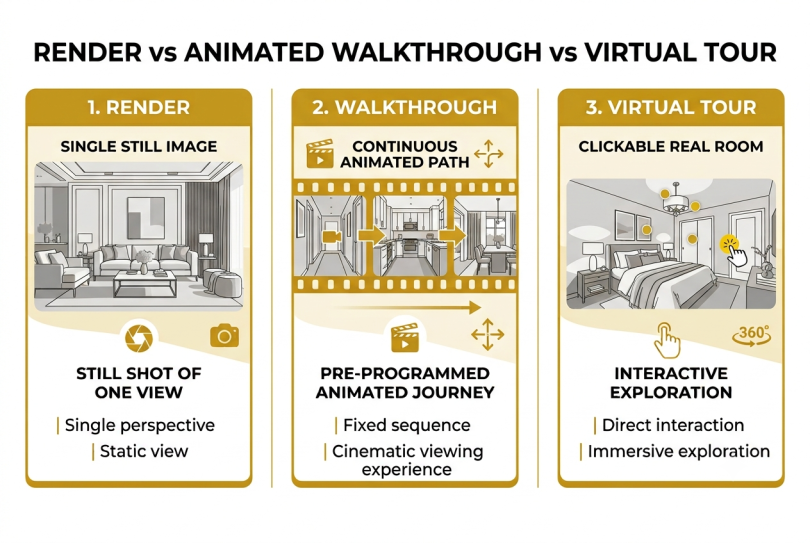
An animated walkthrough is a moving, 3D tour through a home design before it is built. The camera walks you room to room, showing scale, flow, and light in motion. It is easy to confuse three common terms — render, walkthrough and virtual tour, so here is the difference:
- Render: A single still image of one view.
- Walkthrough: A continuous animated path through the whole space.
- Virtual tour: A clickable trip through a real, finished room.
For a remodel or new build, 3D home walkthroughs and architectural walkthroughs belong in the planning stage. That is when changes are still cheap. They fit naturally into the home remodeling process.
| What is an Animated Home Design Walkthrough?A walkthrough is a moving 3D tour of your design, not a single still render. |
How Do Animated Home Design Walkthroughs Improve Client Communication?
Animated home design walkthroughs work because they replace description with a shared picture. Instead of “imagine a wider island,” you both watch the camera move past the real proposed island. That single source of truth is the core of better communication.
Here are practical ways that animated home design walkthroughs improve client communication.
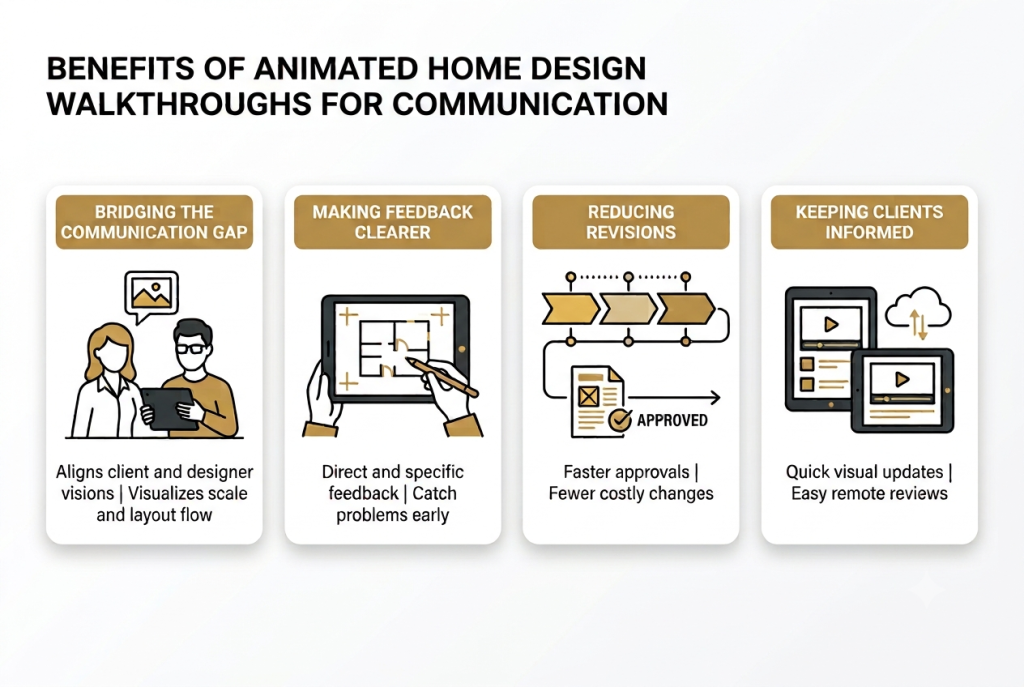
Bridging the Communication Gap
Home design communication breaks down because words and drawings leave too much to the imagination. You say “open and airy”; your designer hears something else.
Floor plans, swatches, and mood boards each show a piece, never the whole room in motion. This is the imagination gap, and it is where client communication in home design usually fails, despite choosing the right home project partner.
Animated home design walkthroughs close this gap by showing scale, movement, and flow before construction begins. Clients can see how rooms connect, the space available and even how different elements work together.
Making Feedback Clearer
You can catch problems while they are still lines on a screen. In motion, problems like a doorway that blocks a sightline or a cramped corner are obvious.
Animated home design walkthroughs double as an interior design presentation, showing finishes and light in one view. Good smart space planning becomes obvious once you can walk through it.
Because you react to something concrete, your feedback gets specific. Your designer spends less time guessing what you meant.
Reducing Revisions and Delays
When clients can see the design, they approve it faster and change it less. Confidence rises when there is nothing left to imagine, so sign-offs happen sooner.
According to Zillow’s 2024 Consumer Housing Trends Report, 62% of buyers prefer home listings with immersive 3D tours. People feel more confident when they can explore a space before making decisions.
Animated home design walkthroughs create the same confidence during the design stage. That clarity leads to faster approvals and fewer late design changes.
Fewer late change orders means a calmer budget, which matters on any budget renovation. Faster approvals keep the whole project on schedule.
Keeping Clients Informed Throughout the Project
Client communication does not end after the first walkthrough. Design projects often include updates and decisions that require explanations.
Short animated clips give designers a simple way to share updates. A quick video can show a design change, compare options, or explain the next project stage.
Remote clients can also review these updates without attending every meeting. They can see changes visually instead of trying to understand complex drawings or written descriptions.
Tools have made animated communication more practical for regular projects, not only large builds. A free animation maker like Adobe Express can turn a voice recording into a simple animated video.
Designers can use these animated home design walkthroughs during modern interior design projects to keep clients involved. A full walkthrough may not be necessary for every update. Sometimes, a short animation can explain a small change clearly.
| How Do Animated Home Design Walkthroughs Improve Client Communication?Animated home design walkthroughs give homeowners and designers a shared view of the project. They improve communication, simplify feedback, and help projects move forward with fewer revisions. |
FAQ
1. What is an animated design walkthrough?
It is a moving 3D tour of a home design before construction. You move room to room on screen and see the real scale and light before anything gets built.
2. What is the difference between a 3D render, a walkthrough, and a virtual tour?
A 3D render shows one still view of a design. A walkthrough shows a moving path through an unbuilt space, while a virtual tour is a clickable trip through a real, finished space. In short: still image, animated path, or real-space tour.
3. How do animated walkthroughs improve client communication?
Animated home design walkthroughs replace design descriptions with a shared visual reference. Feedback is specific and misunderstandings are cleared early rather than during the building process.
4. Do walkthroughs actually reduce revisions and change orders?
Often, yes. When clients approve a space they can see, fewer surprises appear during the build. That means fewer late change orders, which can be expensive.
5. Are animated walkthroughs worth it for a small home project?
Small updates may need a render or short clip while larger layout changes would benefit more from a full walkthrough. It depends on the project size and complexity.
6. How do walkthroughs help clients who cannot read floor plans?
Walkthroughs make designs easy to understand by showing the space in motion. Clients get to judge room layouts and proportions without having to interpret technical drawings.
7. Can a walkthrough be shared with a remote client?
Yes. Designers can share walkthrough videos or links with remote clients. Clients can review the design and details, and provide feedback from anywhere.
8. How do I get started if I do not have a big budget?
Start small. Ask your designer for a short animated clip of one decision, or make one yourself with a free animation maker. You do not need a studio.
Conclusion
Animated home design walkthroughs turn unclear ideas into a shared visual experience. Instead of asking clients to imagine the final space, designers can show how the design will look and feel.
A clear view of the project helps homeowners make better decisions. It also reduces misunderstandings and prevents costly changes later.
These tools are becoming easier to use for projects of all sizes. Homeowners can explore design ideas without needing a large studio or complex setup.
If you are planning a remodel, ask your designer how an animated walkthrough can improve your project. You can also browse more interior design trends while planning your space and finding ideas that match your vision.